App icons that still look like a set on your actual phone.
Pocket Icon Studio — 256 App Icons, 4 Themes, 8 Wallpapers
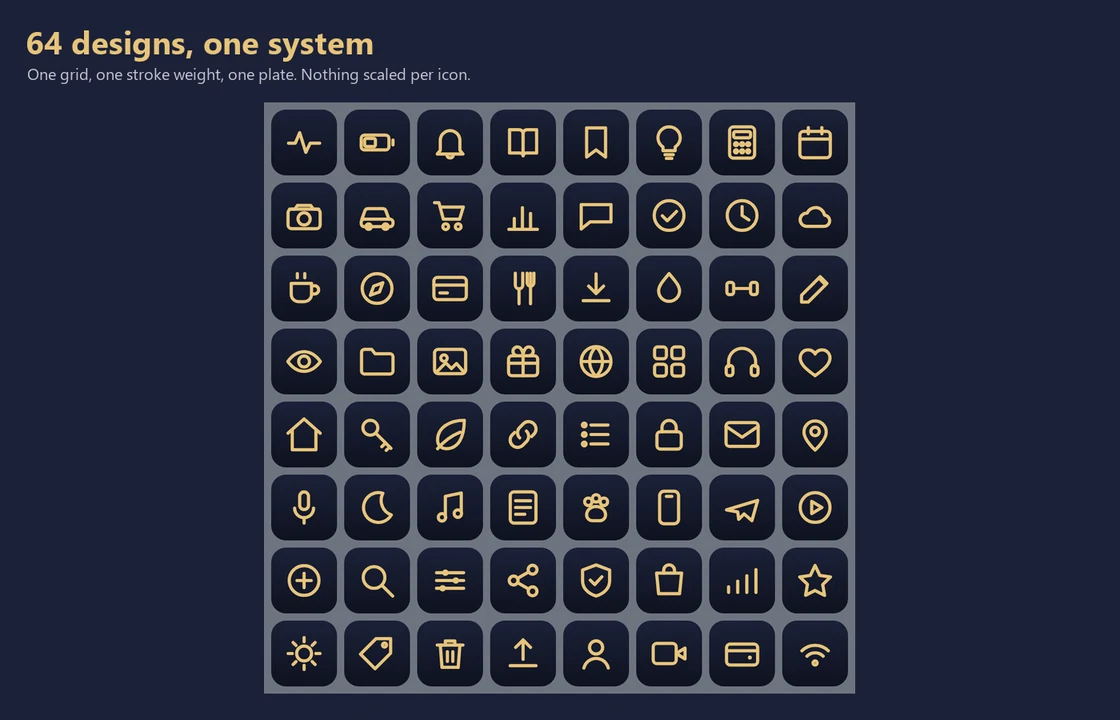
Every one of the 64 designs is defined as geometry on the same 24-unit grid and rendered by one program with a single stroke weight, a single padding and a single plate shape — nothing is scaled or nudged per icon. That is why a full home screen of them looks deliberate rather than like a jumble, which is the usual fate of bundles containing thousands of files. And because an icon is designed at 512 pixels but lived with at about 60, every single file is downscaled to 60 and measured again before release. If a design turns to mush at real size, it does not ship.
Instant .zip download after checkout on Payhip (5.6 MB). Nothing is shipped.
What's included
- 256 icons — 64 designs × 4 themes, every file 512×512 PNG
- Four themes: champagne (light), midnight gold and slate (dark), ink (OLED true-black)
- 8 wallpapers — each theme at both iPhone and Android resolutions
- A searchable index page that filters all 64 designs as you type, and works offline
- An install guide for iPhone and Android, including what iOS genuinely cannot do
- A written account of what every file was measured against before release
Works in
- iPhone / iPad — via the Shortcuts app (iOS provides no way to replace a real app icon)
- Android — Nova Launcher, Lawnchair and other custom launchers set icons per app
- Any design tool — 512px PNG works in Figma, Canva, Photoshop, Keynote, PowerPoint
- Websites and documents — the licence covers commercial and client work
Measured before release, not just exported
All 256 icons and 8 wallpapers verified: exact 512×512 dimensions, glyph measurably visible against its plate, and still readable when downscaled to 60px — the size an icon is actually used at. Wallpapers confirmed at the resolutions their filenames claim. The build refuses to package if any file fails.
Who it's for
- Anyone who wants a home screen that looks designed rather than decorated
- People who bought a 5,000-icon bundle and found nothing in it matched anything else
- Designers who want a consistent icon set for slides, sites and client work
- OLED phone owners — the ink theme is built for true-black screens
Who it's not for
- Anyone wanting brand logos. There are none, deliberately — a recognisable app logo is a trademark, and shipping one would hand the legal problem to you. You match icons to apps by what the app does
- Anyone expecting to replace real iPhone app icons — iOS does not allow it. Every pack on every store uses Shortcuts instead, and the guide is honest about the two side effects
- Anyone wanting resale rights, SVG source or an icon font
Icon appearance depends on your launcher, phone and wallpaper. On iPhone, icons are applied through Shortcuts because iOS provides no other route — which means a brief flash of the Shortcuts app when tapping, and no notification badge on the shortcut. Both are properties of iOS rather than of these files, and both are explained in the guide.
Guidance, not gospel — this is a practical organisation tool, not legal, tax, medical, or religious authority.
Licence
Use them on your own devices and in your own personal and commercial design work, including paid client projects, with no attribution and no per-project fee. Modify them freely. You may not resell or redistribute the icon files themselves, or sell them converted to SVG, icon fonts or Figma libraries.
Held to The CalmKit Standard
Last reviewed August 2026 · All 256 icons and 8 wallpapers verified: exact 512×512 dimensions, glyph measurably visible against its plate, and still readable when downscaled to 60px — the size an icon is actually used at. Wallpapers confirmed at the resolutions their filenames claim. The build refuses to package if any file fails.
Drafted with AI assistance and then reviewed and curated by a real person who's been through it.
Please verify independently. Where a step depends on current rules or prices, the pack says so on the page.
Before you buy
How do I get my kit after buying?
Every kit is a digital PDF with instant download — the file is available the moment your payment goes through on Payhip. Nothing is shipped, and there's no waiting.
Can I fill the kit in on my phone or tablet?
Yes. Print the whole binder, print only the checklists you need, or open the PDF in any reader and type into the trackers on screen. Pages are A4 and print cleanly on US Letter too.
What if something is wrong with my file?
If your download is broken or isn't what the listing describes, message the shop and we'll make it right. We'd rather fix a problem than argue about it.